What Happened
One evening, I noticed an unusual spike in my server logs showing thousands of POST requests targeting the xmlrpc.php file on my WordPress site. These requests originated through my Cloudflare Tunnel and appeared as internal traffic (127.0.0.1), making the activity initially subtle but relentless.
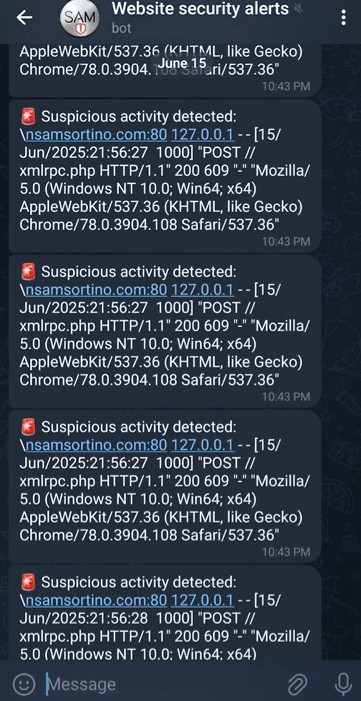
This raised immediate concerns as xmlrpc.php is a well-known WordPress endpoint frequently exploited by attackers for brute-force login attempts and DDoS reflection attacks.
What is xmlrpc.php and Why Was It Targeted?
xmlrpc.php is a legacy WordPress API originally designed to allow remote publishing and interaction with external applications.
But due to its overly permissive design, it has become a prime target for attackers, often exploited to:
- Brute-force login attempts using multi-call methods (credential stuffing).
- DDoS reflection via the pingback functionality.
- Vulnerability probing and user enumeration on WordPress installs.
While once essential, modern WordPress sites rarely need it, and leaving it exposed can severely compromise site security.
Immediate Mitigation Steps
-
Blocked
xmlrpc.phpvia Apache Configuration:
I created an Apache configuration file to deny all access toxmlrpc.phpat the server level:<Files "xmlrpc.php"> Require all denied </Files>Enabled the config and reloaded Apache to apply changes. This ensures that any request toxmlrpc.phpreceives a 403 Forbidden response. -
Set Up Cloudflare WAF Rule:
To stop attack traffic before it reached my server, I created a Cloudflare Web Application Firewall (WAF) rule using the expression:http.request.uri.path contains "/xmlrpc.php"This effectively blocks all requests toxmlrpc.phpat the CDN edge, drastically reducing server load and preventing malicious traffic from entering. -
Stopped the Cloudflare Tunnel Temporarily:
To isolate and verify the source of traffic, I paused the Cloudflare Tunnel. This helped confirm that the traffic seen as127.0.0.1was indeed passing through the tunnel.
Verification & Observations
Local curl Tests:
-
Tested direct access to
xmlrpc.phpon the server with:curl -I http://localhost/xmlrpc.php
Result: Connection refused on port 80 due to configuration changes. -
Confirmed the block on Apache port
8443:curl -kI http://localhost:8443/xmlrpc.php
Result: 403 Forbidden response, confirming server-level blocking.
Cloudflare Edge Testing:
After re-enabling the Cloudflare Tunnel, I tested external access to
https://samsortino.com/xmlrpc.php from a separate device. The request was successfully blocked by the Cloudflare WAF, confirming that the rule was effective.
Log Monitoring:
Ongoing monitoring of Apache access logs showed no further xmlrpc.php requests, indicating successful mitigation.
Additional Observations:
-
Observed bot behavior requesting
/favicon.icoimmediately afterxmlrpc.php. This triggered 302 redirects to the actual favicon image - typical bot scanning behavior, not a threat. - Verified Apache service status and configuration to ensure no unintended downtime occurred during mitigation steps.
Lessons Learnt
-
Legacy endpoints like
xmlrpc.phppose significant security risks if left exposed. - Combining server-level controls with CDN-level firewall rules provides layered security.
- Real-time alerts (in my case, via Telegram notifications) are invaluable for detecting suspicious activity early.
-
Cloudflare Tunnel can mask real external IPs as
127.0.0.1, so understanding your network topology is essential during incident investigation.